> ## Documentation Index
> Fetch the complete documentation index at: https://docs.quark.bot/llms.txt
> Use this file to discover all available pages before exploring further.
# Automations
> Rules that do something extra when a log is produced
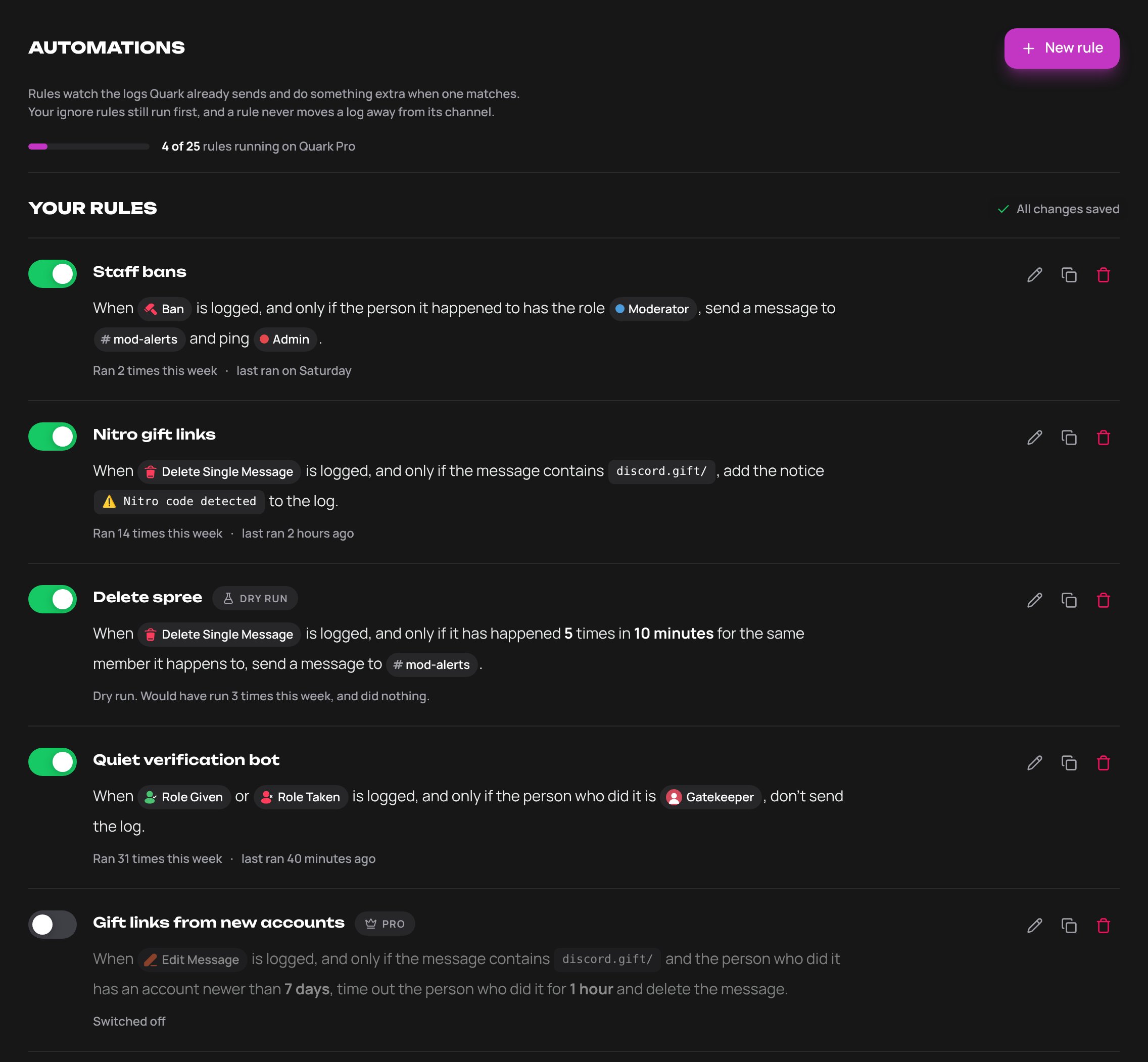
An automation is a rule that watches the logs Quark already sends and acts when one matches. A rule can post an alert, add a notice to the log, hold the log back, and, with Quark Pro, moderate.
Rules are on the dashboard under **Automations** in the sidebar. There is also an **Open Automations** button at the bottom of **Logging → Ignore Rules**. The Quark and Quark Pro bots each have their own rules.
 ## Create a rule
Choose **Start from scratch**, or one of the ideas under **Or start from an idea**. An idea opens with its channel, role or member left blank for you to fill in.
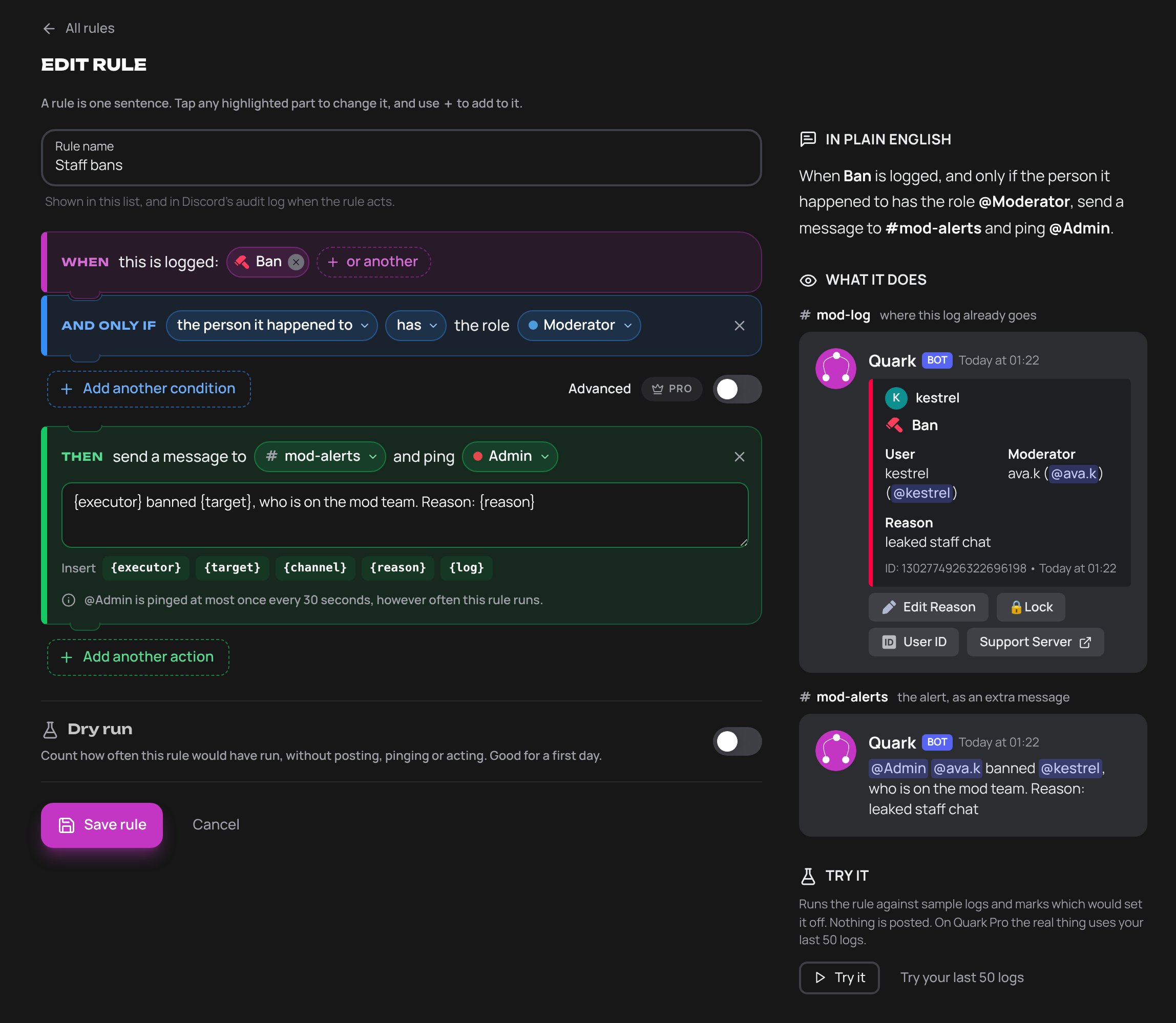
A rule is one sentence in three parts: **When** this is logged, **And only if** something is true, **Then** do this. Press any highlighted part to change it.
The panel beside the rule reads it back **In plain English**, shows **What it does** on a sample log, and has a **Try it** button. For a first day, switch **Dry run** on.
The rule starts running straight away. Use the switch on its row to turn it off.
## Create a rule
Choose **Start from scratch**, or one of the ideas under **Or start from an idea**. An idea opens with its channel, role or member left blank for you to fill in.
A rule is one sentence in three parts: **When** this is logged, **And only if** something is true, **Then** do this. Press any highlighted part to change it.
The panel beside the rule reads it back **In plain English**, shows **What it does** on a sample log, and has a **Try it** button. For a first day, switch **Dry run** on.
The rule starts running straight away. Use the switch on its row to turn it off.
 ## What a rule is made of
### When
The logs the rule watches: any [log type](/logs/types), or **Anything in** a whole category. A rule can watch up to 10.
A rule cannot watch Rule Action, Multiple Voice Channel Events or Multiple Reactions Removed. When voice events or reaction removals are [bundled](/logs/behaviour#bundling) into one log, each event still runs the rules that watch its own log type. An event a rule holds back is left out of the bundle. A notice is only shown on an event that is sent as a log of its own.
### And only if
Up to 8 conditions. All of them have to be true. With none, the rule runs on every log it watches.
| Condition | What it tests |
| - | - |
| Someone has a certain role | The person who did it, or the person it happened to, has or doesn't have a role |
| It's a particular person | The person who did it, or the person it happened to, is or is not one member |
| A bot did it | The person who did it, or the person it happened to, is or is not a bot |
| It happened in a certain channel | In one channel, or outside it |
| The message says something | The message, the reason or the name contains, doesn't contain, starts with or matches some text. Case is ignored. In **matches**, `*` stands for any run of characters without a space, so `discord.gift/*` catches every gift link |
| It keeps happening | It has happened a number of times in a window, from 1 minute to 24 hours, for the same member doing it, member it happens to, or channel |
| The account is new | The account is newer than a number of days |
* A condition about something the log does not say is not met. Its opposite is not met either. A rule about "the person who did it" does not run on a log that names nobody.
* **It keeps happening** counts every log the rule watches for that member or channel, not only the ones that meet the other conditions. A rule can have two of these. A rule that counts cannot also add a notice or hold the log back.
* When a log names a moderator only because a bot put their ID at the start of its audit log reason, a rule treats the bot as the person who did it. Conditions, counts and `{executor}` all read the bot. Wick, YAGPDB, Sapphire, ProBot and Quark's own commands are the exception. See [your own bot](/logs/integrations#your-own-bot).
### Then
Up to 4 actions, carried out in order.
| Action | What it does | Plan |
| - | - | - |
| Tell a channel | Posts a message you write, up to 1,000 characters, in a channel you choose, and can ping one role | Free |
| Add a notice to the log | Adds a **Notice** line to the log itself, up to 100 characters | Free |
| Don't send this log | Holds the log back from your log channel. Not on a rule that watches a Quark Events log: those cannot be held back | Free |
| Time someone out | For 60 seconds, 5 or 10 minutes, 1 hour, 1 day or 1 week | Quark Pro |
| Kick someone | | Quark Pro |
| Ban someone | | Quark Pro |
| Delete the message | Deletes the message the log is about. Only on a rule that watches nothing but message edits and pins, where the message still exists | Quark Pro |
| Give or take a role | | Quark Pro |
| Send someone a DM | Up to 1,000 characters and 20 lines | Quark Pro |
The six Quark Pro actions are the **moderation actions**. Apart from Delete the message, each acts on the person who did it or the person it happened to, whichever you choose.
An alert or a direct message can include `{executor}`, `{target}`, `{channel}`, `{reason}` and `{log}`. Quark fills them in from the log.
A rule that holds a log back also stops the rules listed after it for that log. Rules run in the order they are listed.
If Quark cannot tell whether a rule that holds logs back matches a log, because the rule hit an error or ran out of time, the log is sent and the rules listed after it do not run for that log.
## Starters
| Starter | Plan |
| - | - |
| Tell a channel when someone with a role is banned | Free |
| Flag deleted messages that contain a Nitro gift link | Free |
| Alert a channel when one member has 5 messages deleted in 10 minutes | Free |
| Don't log role changes made by our verification bot | Free |
| Time out new accounts that edit a gift link into a message | Quark Pro |
## Dry run and Try it
* **Dry run** is a switch on the rule. A rule in dry run counts how often it would have run and does nothing else: no post, no ping, no action. Its row shows the count for the week.
* **Try it** runs the rule you are editing against sample logs and marks which would set it off. Nothing is posted.
* **Try your last 50 logs**, on Quark Pro, does the same against the last 50 logs of the types the rule watches. Someone with [dashboard access](/dashboard/access) needs View logs and View log history to use it.
## What each plan gets
| | Free | Pro Lite | Quark Pro |
| - | - | - | - |
| Rules | 1 | 3 | 25 |
| Alerts, notices and holding a log back | Yes | Yes | Yes |
| Moderation actions | No | No | Yes |
| Advanced conditions | No | No | Yes |
| Try your last 50 logs | No | No | Yes |
A rule that is switched off still counts towards the number.
When a plan ends, nothing is deleted. Rules that need Quark Pro are **Parked**, and so are rules beyond the plan's number, counted in the order they are listed. Parked rules run again when the server has the plan.
## Who can view and edit rules
| | Who |
| - | - |
| View | Anyone who manages the server in Discord, and anyone given **View configuration** under [dashboard access](/dashboard/access) |
| Edit | Anyone who manages the server in Discord, and anyone given **Manage automations** |
Being able to edit rules is not enough for a moderation action. The person saving the rule also needs the matching permission in Discord, and Quark needs its own.
| Action | You need in Discord | Quark needs |
| - | - | - |
| Tell a channel | Nothing extra | View Channel and Send Messages in that channel |
| Time someone out | Timeout Members | Timeout Members |
| Kick someone | Kick Members | Kick Members |
| Ban someone | Ban Members | Ban Members |
| Delete the message | Manage Messages | Manage Messages in the message's channel |
| Give or take a role | Manage Roles, and the role must be below your own highest role | Manage Roles, and the role must be below Quark's highest role |
| Send someone a DM | Timeout Members | Nothing |
* The dashboard's messages call Timeout Members "Moderate Members". It is the same permission.
* The server owner can save any rule. Administrator covers the permissions, but not the rule about your highest role.
* Only the server owner can save a rule that **gives** a role with a moderation or management permission, or switch it on, rename it or take it out of dry run. Those permissions are Administrator, Manage Server, Manage Channels, Manage Roles, Manage Messages, Manage Webhooks, Manage Expressions, Manage Threads, Kick Members, Ban Members and Timeout Members. Only the role's own permissions are read, not what a channel allows it. Anyone who can edit rules can still switch such a rule off or put it into dry run, and a rule that takes such a role is not restricted this way.
* Quark asks Discord for your permissions each time you save a rule with a moderation action, switch it on, take it out of dry run or rename it. If Discord does not answer, the change is refused.
* The rule then acts for you. See [who a rule acts for](#who-a-rule-acts-for).
* If Quark is missing a permission, the step is skipped and the rule's row says why. See [permissions](/permissions#for-automations).
### Changes that let more logs reach a rule
Some changes make a rule run on logs it did not see before, without the rule itself being touched. On a server with a moderation rule, even one that is switched off, each of these needs the Discord permission for every moderation action the server's rules take, and a highest role above any role they give or take:
* Changing the order of the rules.
* Deleting, switching off, putting into dry run or editing a rule that holds logs back.
* Under **Logging**: removing an [ignore rule](/logs/options#ignore-rules), switching a log type or a category on, switching **Actions by bots**, **Actions on bots** or **PluralKit Compatibility** off, giving logs a channel where they had nowhere to go, and setting or clearing the Files channel.
The troubleshooter's fixes on the dashboard and [importing settings](/dashboard/overview#import-settings-from-another-server) are checked the same way.
* If one of the server's rules gives a role with a moderation or management permission, only the server owner can make these changes.
* Changes that leave more out, such as adding an ignore rule or switching a log type off, are never checked. Neither is switching Active Ignore on or off.
* Quark asks Discord for your permissions when you make the change. If Discord does not answer, the change is refused.
* The Logging pages do not say which permission is missing. They say "You don't have permission to do that."
* This is checked on the dashboard. The `/logging` and `/troubleshoot` commands in Discord go by their own permissions.
## Who a rule acts for
A rule moderates on behalf of whoever last changed it: the person who created it, or who last edited it, renamed it, switched it on or off, or put it into or out of dry run. Pressing **Save rule** with nothing changed does not count, and neither does changing the order.
Each time a rule is about to moderate, Quark checks what that person could do themselves in Discord at that moment.
| Action | The person who last changed the rule must |
| - | - |
| Every moderation action | Still be in the server, and not be timed out |
| Time someone out, kick, ban, give or take a role, send a DM | Still hold the permission in the table above |
| Time someone out, kick or ban | Have a highest role above the member's highest role |
| Delete the message | Have Manage Messages in the channel the message is in |
| Give or take a role | Have a highest role above the role |
| Give a role with a moderation or management permission | Be the server owner |
* The server owner passes every check. Administrator covers the permissions, but not the two rows about the highest role.
* The permission has to come from one of the person's own roles. One that only @everyone has does not count.
* When a check fails, that step is skipped and uses nothing from the [hourly limits](#safety-rules). Alerts, notices and held-back logs are not affected.
### If a rule stops acting
A rule stops moderating when the person who last changed it leaves the server or loses the permission, and for as long as they are timed out. The rule's row says that Quark, or the person who last changed the rule, is missing a permission. The **Rule Action** log in your server says which of the two it is.
To fix it, someone who holds the permission edits the rule, or switches it off and on. A timeout also ends on its own. The rule then acts for them. The dashboard does not show who last changed a rule. The **Logging Options Updated** logs about the rule do.
A rule that deletes messages shows the same thing after it is set off in a channel where the person who last changed it cannot delete messages. It goes on deleting in the other channels.
## Safety rules
**Who a rule never acts on.** A timeout, kick, ban, role change or message delete is never carried out on:
* the server owner
* Quark itself
* a member whose highest role is level with or above Quark's highest role
* someone who is no longer in the server
A timeout, kick or ban is also never carried out on a member whose highest role is level with or above that of the person who last changed the rule, unless that person owns the server. See [who a rule acts for](#who-a-rule-acts-for).
**Never on a guess.** A rule does not act on "the person who did it" when Quark only worked out who that was:
* On these logs Quark cannot be certain who did it, so a rule that acts on the person who did it cannot be saved: deleted messages, bulk deletes, attachments and polls, Moved, Disconnected, server mutes and deafens, pins, and removed reactions. For a removed reaction, Discord says whose reaction it was and not who removed it. For the others, Quark matches the event to the audit log and can be wrong.
* When the moderator was found through [another bot](/logs/integrations), as in "using Sapphire", the step is skipped.
Acting on the person it happened to is not affected. A bulk delete, a pin and a removed reaction have nobody they happened to, so a moderation action does nothing on those logs. Send an alert instead.
**Hourly limits.**
| | Alerts an hour | Members moderated an hour |
| - | - | - |
| One rule | 30 | 10 |
| The whole server | 120 | 30 |
* Moderation is counted in members, not actions. Everything one rule does to the same member in an hour counts once.
* One rule acts on the same member at most 20 times an hour.
* A member that two rules act on counts once for each rule towards the server's 30.
* Each member a rule moderates also uses one of the alerts in the first column. Moderation does not stop when the alerts run out.
* Notices and held-back logs are not counted, and neither is an action that was skipped.
* Past a limit, actions are skipped until the next hour. The rule's row says so.
**Pings.** An alert pings only the one role you choose, and never @everyone or @here. A role is pinged at most once every 30 seconds. An alert inside that time is still posted, without the ping. Mentions in the alert's text, and anything filled in from a log, do not ping.
**Direct messages.**
* Sent only to people who are in the server, and never to a bot.
* Not sent to the person a User Left, Kick, Ban or Bot Removed log is about. They have left.
* One rule messages one member at most once every 10 minutes.
* Quark adds a last line that the rule cannot remove: "Sent automatically by a rule in" and the server's name.
* Members with DMs closed do not get the message.
**Also:**
* A rule acts once on each event, however many times Discord reports it.
* What Quark does itself never sets a rule off. A rule that bans does not trigger a rule that watches bans.
* A rule's timeout never shortens a longer timeout.
* Rules only see logs that pass your [ignore rules](/logs/options#ignore-rules) and have a log channel. A rule never moves a log to another channel.
## What is logged
| What | Where |
| - | - |
| An alert, a moderation action, a rule reaching its hourly limit, a rule that could not act | A **Rule Action** log, in Quark Events |
| A rule created, edited, renamed, switched on or off, put into or out of dry run, or deleted | A **Logging Options Updated** log, with who did it |
| A log a rule held back | Not posted to Discord. The [log viewer](/logs/viewer) shows it, marked **Held back by rule** |
| A timeout, kick, ban, role change or deleted message | Discord's audit log, with the reason `Quark rule:` and the rule's name |
* Moderation actions are logged even when the Rule Action log type is switched off. Alerts and the other two follow the switch.
* A rule reaching its limit, or failing to act, is logged at most once an hour for each rule and reason.
* Notices and held-back logs do not produce a Rule Action log.
## Advanced conditions
With Quark Pro, switch **Advanced** on to write the condition as one expression. It can say things the blocks cannot, such as either/or. Switching Advanced off turns the expression back into blocks when it is simple enough.
```
executor.bot && content matches "discord.gift/*"
@Staff in target.roles || target.accountAgeDays < 7
count(10m, target) >= 5
reason contains executor.id
```
* Join with `&&`, `||`, `!` and brackets. Compare with `==`, `!=`, `<`, `<=`, `>`, `>=`.
* Text has `contains`, `startsWith` and `matches`. Put text in double quotes.
* Write a role or member as `@name` and a channel as `#name`. Test a role with `in`, as in `@Staff in executor.roles`.
* `count(10m)` is how many times the rule's logs have happened in the window for the same member doing it. Add `target` or `channel` to count for those instead.
* An expression can be up to 500 characters.
| Field | Type | What it is |
| - | - | - |
| `executor`, `target` | member | Who did it, who it happened to |
| `executor.name`, `target.name` | text | Their username |
| `executor.id`, `target.id` | text | Their Discord ID |
| `executor.bot`, `target.bot` | yes/no | Whether they are a bot |
| `executor.roles`, `target.roles` | roles | The roles they have |
| `executor.accountAgeDays`, `target.accountAgeDays` | number | Days since their account was made |
| `channel` | channel | Where it happened |
| `content` | text | The message text. After an edit, the new text |
| `contentBefore` | text | The text before an edit |
| `reason` | text | The reason given |
| `name` | text | The role, thread, emoji or invite the log names |
| `attachments` | number | How many files the message had |
| `amount` | number | How many messages or members a bulk log covers |
## The API
[API tokens](/api-reference/introduction) cannot read or change automations. Rules are managed on the dashboard only.
An Admin token can still change logging settings, and it is not asked for the [Discord permissions](#changes-that-let-more-logs-reach-a-rule) a person on the dashboard needs for those changes.
This documentation is built and hosted on [Mintlify](https://mintlify.com), a developer documentation platform.
## What a rule is made of
### When
The logs the rule watches: any [log type](/logs/types), or **Anything in** a whole category. A rule can watch up to 10.
A rule cannot watch Rule Action, Multiple Voice Channel Events or Multiple Reactions Removed. When voice events or reaction removals are [bundled](/logs/behaviour#bundling) into one log, each event still runs the rules that watch its own log type. An event a rule holds back is left out of the bundle. A notice is only shown on an event that is sent as a log of its own.
### And only if
Up to 8 conditions. All of them have to be true. With none, the rule runs on every log it watches.
| Condition | What it tests |
| - | - |
| Someone has a certain role | The person who did it, or the person it happened to, has or doesn't have a role |
| It's a particular person | The person who did it, or the person it happened to, is or is not one member |
| A bot did it | The person who did it, or the person it happened to, is or is not a bot |
| It happened in a certain channel | In one channel, or outside it |
| The message says something | The message, the reason or the name contains, doesn't contain, starts with or matches some text. Case is ignored. In **matches**, `*` stands for any run of characters without a space, so `discord.gift/*` catches every gift link |
| It keeps happening | It has happened a number of times in a window, from 1 minute to 24 hours, for the same member doing it, member it happens to, or channel |
| The account is new | The account is newer than a number of days |
* A condition about something the log does not say is not met. Its opposite is not met either. A rule about "the person who did it" does not run on a log that names nobody.
* **It keeps happening** counts every log the rule watches for that member or channel, not only the ones that meet the other conditions. A rule can have two of these. A rule that counts cannot also add a notice or hold the log back.
* When a log names a moderator only because a bot put their ID at the start of its audit log reason, a rule treats the bot as the person who did it. Conditions, counts and `{executor}` all read the bot. Wick, YAGPDB, Sapphire, ProBot and Quark's own commands are the exception. See [your own bot](/logs/integrations#your-own-bot).
### Then
Up to 4 actions, carried out in order.
| Action | What it does | Plan |
| - | - | - |
| Tell a channel | Posts a message you write, up to 1,000 characters, in a channel you choose, and can ping one role | Free |
| Add a notice to the log | Adds a **Notice** line to the log itself, up to 100 characters | Free |
| Don't send this log | Holds the log back from your log channel. Not on a rule that watches a Quark Events log: those cannot be held back | Free |
| Time someone out | For 60 seconds, 5 or 10 minutes, 1 hour, 1 day or 1 week | Quark Pro |
| Kick someone | | Quark Pro |
| Ban someone | | Quark Pro |
| Delete the message | Deletes the message the log is about. Only on a rule that watches nothing but message edits and pins, where the message still exists | Quark Pro |
| Give or take a role | | Quark Pro |
| Send someone a DM | Up to 1,000 characters and 20 lines | Quark Pro |
The six Quark Pro actions are the **moderation actions**. Apart from Delete the message, each acts on the person who did it or the person it happened to, whichever you choose.
An alert or a direct message can include `{executor}`, `{target}`, `{channel}`, `{reason}` and `{log}`. Quark fills them in from the log.
A rule that holds a log back also stops the rules listed after it for that log. Rules run in the order they are listed.
If Quark cannot tell whether a rule that holds logs back matches a log, because the rule hit an error or ran out of time, the log is sent and the rules listed after it do not run for that log.
## Starters
| Starter | Plan |
| - | - |
| Tell a channel when someone with a role is banned | Free |
| Flag deleted messages that contain a Nitro gift link | Free |
| Alert a channel when one member has 5 messages deleted in 10 minutes | Free |
| Don't log role changes made by our verification bot | Free |
| Time out new accounts that edit a gift link into a message | Quark Pro |
## Dry run and Try it
* **Dry run** is a switch on the rule. A rule in dry run counts how often it would have run and does nothing else: no post, no ping, no action. Its row shows the count for the week.
* **Try it** runs the rule you are editing against sample logs and marks which would set it off. Nothing is posted.
* **Try your last 50 logs**, on Quark Pro, does the same against the last 50 logs of the types the rule watches. Someone with [dashboard access](/dashboard/access) needs View logs and View log history to use it.
## What each plan gets
| | Free | Pro Lite | Quark Pro |
| - | - | - | - |
| Rules | 1 | 3 | 25 |
| Alerts, notices and holding a log back | Yes | Yes | Yes |
| Moderation actions | No | No | Yes |
| Advanced conditions | No | No | Yes |
| Try your last 50 logs | No | No | Yes |
A rule that is switched off still counts towards the number.
When a plan ends, nothing is deleted. Rules that need Quark Pro are **Parked**, and so are rules beyond the plan's number, counted in the order they are listed. Parked rules run again when the server has the plan.
## Who can view and edit rules
| | Who |
| - | - |
| View | Anyone who manages the server in Discord, and anyone given **View configuration** under [dashboard access](/dashboard/access) |
| Edit | Anyone who manages the server in Discord, and anyone given **Manage automations** |
Being able to edit rules is not enough for a moderation action. The person saving the rule also needs the matching permission in Discord, and Quark needs its own.
| Action | You need in Discord | Quark needs |
| - | - | - |
| Tell a channel | Nothing extra | View Channel and Send Messages in that channel |
| Time someone out | Timeout Members | Timeout Members |
| Kick someone | Kick Members | Kick Members |
| Ban someone | Ban Members | Ban Members |
| Delete the message | Manage Messages | Manage Messages in the message's channel |
| Give or take a role | Manage Roles, and the role must be below your own highest role | Manage Roles, and the role must be below Quark's highest role |
| Send someone a DM | Timeout Members | Nothing |
* The dashboard's messages call Timeout Members "Moderate Members". It is the same permission.
* The server owner can save any rule. Administrator covers the permissions, but not the rule about your highest role.
* Only the server owner can save a rule that **gives** a role with a moderation or management permission, or switch it on, rename it or take it out of dry run. Those permissions are Administrator, Manage Server, Manage Channels, Manage Roles, Manage Messages, Manage Webhooks, Manage Expressions, Manage Threads, Kick Members, Ban Members and Timeout Members. Only the role's own permissions are read, not what a channel allows it. Anyone who can edit rules can still switch such a rule off or put it into dry run, and a rule that takes such a role is not restricted this way.
* Quark asks Discord for your permissions each time you save a rule with a moderation action, switch it on, take it out of dry run or rename it. If Discord does not answer, the change is refused.
* The rule then acts for you. See [who a rule acts for](#who-a-rule-acts-for).
* If Quark is missing a permission, the step is skipped and the rule's row says why. See [permissions](/permissions#for-automations).
### Changes that let more logs reach a rule
Some changes make a rule run on logs it did not see before, without the rule itself being touched. On a server with a moderation rule, even one that is switched off, each of these needs the Discord permission for every moderation action the server's rules take, and a highest role above any role they give or take:
* Changing the order of the rules.
* Deleting, switching off, putting into dry run or editing a rule that holds logs back.
* Under **Logging**: removing an [ignore rule](/logs/options#ignore-rules), switching a log type or a category on, switching **Actions by bots**, **Actions on bots** or **PluralKit Compatibility** off, giving logs a channel where they had nowhere to go, and setting or clearing the Files channel.
The troubleshooter's fixes on the dashboard and [importing settings](/dashboard/overview#import-settings-from-another-server) are checked the same way.
* If one of the server's rules gives a role with a moderation or management permission, only the server owner can make these changes.
* Changes that leave more out, such as adding an ignore rule or switching a log type off, are never checked. Neither is switching Active Ignore on or off.
* Quark asks Discord for your permissions when you make the change. If Discord does not answer, the change is refused.
* The Logging pages do not say which permission is missing. They say "You don't have permission to do that."
* This is checked on the dashboard. The `/logging` and `/troubleshoot` commands in Discord go by their own permissions.
## Who a rule acts for
A rule moderates on behalf of whoever last changed it: the person who created it, or who last edited it, renamed it, switched it on or off, or put it into or out of dry run. Pressing **Save rule** with nothing changed does not count, and neither does changing the order.
Each time a rule is about to moderate, Quark checks what that person could do themselves in Discord at that moment.
| Action | The person who last changed the rule must |
| - | - |
| Every moderation action | Still be in the server, and not be timed out |
| Time someone out, kick, ban, give or take a role, send a DM | Still hold the permission in the table above |
| Time someone out, kick or ban | Have a highest role above the member's highest role |
| Delete the message | Have Manage Messages in the channel the message is in |
| Give or take a role | Have a highest role above the role |
| Give a role with a moderation or management permission | Be the server owner |
* The server owner passes every check. Administrator covers the permissions, but not the two rows about the highest role.
* The permission has to come from one of the person's own roles. One that only @everyone has does not count.
* When a check fails, that step is skipped and uses nothing from the [hourly limits](#safety-rules). Alerts, notices and held-back logs are not affected.
### If a rule stops acting
A rule stops moderating when the person who last changed it leaves the server or loses the permission, and for as long as they are timed out. The rule's row says that Quark, or the person who last changed the rule, is missing a permission. The **Rule Action** log in your server says which of the two it is.
To fix it, someone who holds the permission edits the rule, or switches it off and on. A timeout also ends on its own. The rule then acts for them. The dashboard does not show who last changed a rule. The **Logging Options Updated** logs about the rule do.
A rule that deletes messages shows the same thing after it is set off in a channel where the person who last changed it cannot delete messages. It goes on deleting in the other channels.
## Safety rules
**Who a rule never acts on.** A timeout, kick, ban, role change or message delete is never carried out on:
* the server owner
* Quark itself
* a member whose highest role is level with or above Quark's highest role
* someone who is no longer in the server
A timeout, kick or ban is also never carried out on a member whose highest role is level with or above that of the person who last changed the rule, unless that person owns the server. See [who a rule acts for](#who-a-rule-acts-for).
**Never on a guess.** A rule does not act on "the person who did it" when Quark only worked out who that was:
* On these logs Quark cannot be certain who did it, so a rule that acts on the person who did it cannot be saved: deleted messages, bulk deletes, attachments and polls, Moved, Disconnected, server mutes and deafens, pins, and removed reactions. For a removed reaction, Discord says whose reaction it was and not who removed it. For the others, Quark matches the event to the audit log and can be wrong.
* When the moderator was found through [another bot](/logs/integrations), as in "using Sapphire", the step is skipped.
Acting on the person it happened to is not affected. A bulk delete, a pin and a removed reaction have nobody they happened to, so a moderation action does nothing on those logs. Send an alert instead.
**Hourly limits.**
| | Alerts an hour | Members moderated an hour |
| - | - | - |
| One rule | 30 | 10 |
| The whole server | 120 | 30 |
* Moderation is counted in members, not actions. Everything one rule does to the same member in an hour counts once.
* One rule acts on the same member at most 20 times an hour.
* A member that two rules act on counts once for each rule towards the server's 30.
* Each member a rule moderates also uses one of the alerts in the first column. Moderation does not stop when the alerts run out.
* Notices and held-back logs are not counted, and neither is an action that was skipped.
* Past a limit, actions are skipped until the next hour. The rule's row says so.
**Pings.** An alert pings only the one role you choose, and never @everyone or @here. A role is pinged at most once every 30 seconds. An alert inside that time is still posted, without the ping. Mentions in the alert's text, and anything filled in from a log, do not ping.
**Direct messages.**
* Sent only to people who are in the server, and never to a bot.
* Not sent to the person a User Left, Kick, Ban or Bot Removed log is about. They have left.
* One rule messages one member at most once every 10 minutes.
* Quark adds a last line that the rule cannot remove: "Sent automatically by a rule in" and the server's name.
* Members with DMs closed do not get the message.
**Also:**
* A rule acts once on each event, however many times Discord reports it.
* What Quark does itself never sets a rule off. A rule that bans does not trigger a rule that watches bans.
* A rule's timeout never shortens a longer timeout.
* Rules only see logs that pass your [ignore rules](/logs/options#ignore-rules) and have a log channel. A rule never moves a log to another channel.
## What is logged
| What | Where |
| - | - |
| An alert, a moderation action, a rule reaching its hourly limit, a rule that could not act | A **Rule Action** log, in Quark Events |
| A rule created, edited, renamed, switched on or off, put into or out of dry run, or deleted | A **Logging Options Updated** log, with who did it |
| A log a rule held back | Not posted to Discord. The [log viewer](/logs/viewer) shows it, marked **Held back by rule** |
| A timeout, kick, ban, role change or deleted message | Discord's audit log, with the reason `Quark rule:` and the rule's name |
* Moderation actions are logged even when the Rule Action log type is switched off. Alerts and the other two follow the switch.
* A rule reaching its limit, or failing to act, is logged at most once an hour for each rule and reason.
* Notices and held-back logs do not produce a Rule Action log.
## Advanced conditions
With Quark Pro, switch **Advanced** on to write the condition as one expression. It can say things the blocks cannot, such as either/or. Switching Advanced off turns the expression back into blocks when it is simple enough.
```
executor.bot && content matches "discord.gift/*"
@Staff in target.roles || target.accountAgeDays < 7
count(10m, target) >= 5
reason contains executor.id
```
* Join with `&&`, `||`, `!` and brackets. Compare with `==`, `!=`, `<`, `<=`, `>`, `>=`.
* Text has `contains`, `startsWith` and `matches`. Put text in double quotes.
* Write a role or member as `@name` and a channel as `#name`. Test a role with `in`, as in `@Staff in executor.roles`.
* `count(10m)` is how many times the rule's logs have happened in the window for the same member doing it. Add `target` or `channel` to count for those instead.
* An expression can be up to 500 characters.
| Field | Type | What it is |
| - | - | - |
| `executor`, `target` | member | Who did it, who it happened to |
| `executor.name`, `target.name` | text | Their username |
| `executor.id`, `target.id` | text | Their Discord ID |
| `executor.bot`, `target.bot` | yes/no | Whether they are a bot |
| `executor.roles`, `target.roles` | roles | The roles they have |
| `executor.accountAgeDays`, `target.accountAgeDays` | number | Days since their account was made |
| `channel` | channel | Where it happened |
| `content` | text | The message text. After an edit, the new text |
| `contentBefore` | text | The text before an edit |
| `reason` | text | The reason given |
| `name` | text | The role, thread, emoji or invite the log names |
| `attachments` | number | How many files the message had |
| `amount` | number | How many messages or members a bulk log covers |
## The API
[API tokens](/api-reference/introduction) cannot read or change automations. Rules are managed on the dashboard only.
An Admin token can still change logging settings, and it is not asked for the [Discord permissions](#changes-that-let-more-logs-reach-a-rule) a person on the dashboard needs for those changes.
This documentation is built and hosted on [Mintlify](https://mintlify.com), a developer documentation platform.