> ## Documentation Index
> Fetch the complete documentation index at: https://docs.quark.bot/llms.txt
> Use this file to discover all available pages before exploring further.
# Behaviour
> Learn the data storage behaviour of Quark
## Introduction
Quark stores lots of data, however all this data is "expired" eventually. This page
explains how Quark decides what data to keep and for how long.
## Messages
### For non-Pro servers
Quark has 2 criteria for expiring messages:
1. Messages are older than 12 hours
2. The channel the message was sent to has reached it's message limit
If a message meets either of these criteria, it is deleted from Quark's servers.
Messages are assessed and expired at a regular interval rather than in realtime,
so it is possible that messages which meet the above criteria may still be stored
for a short period of time until they are cleared.
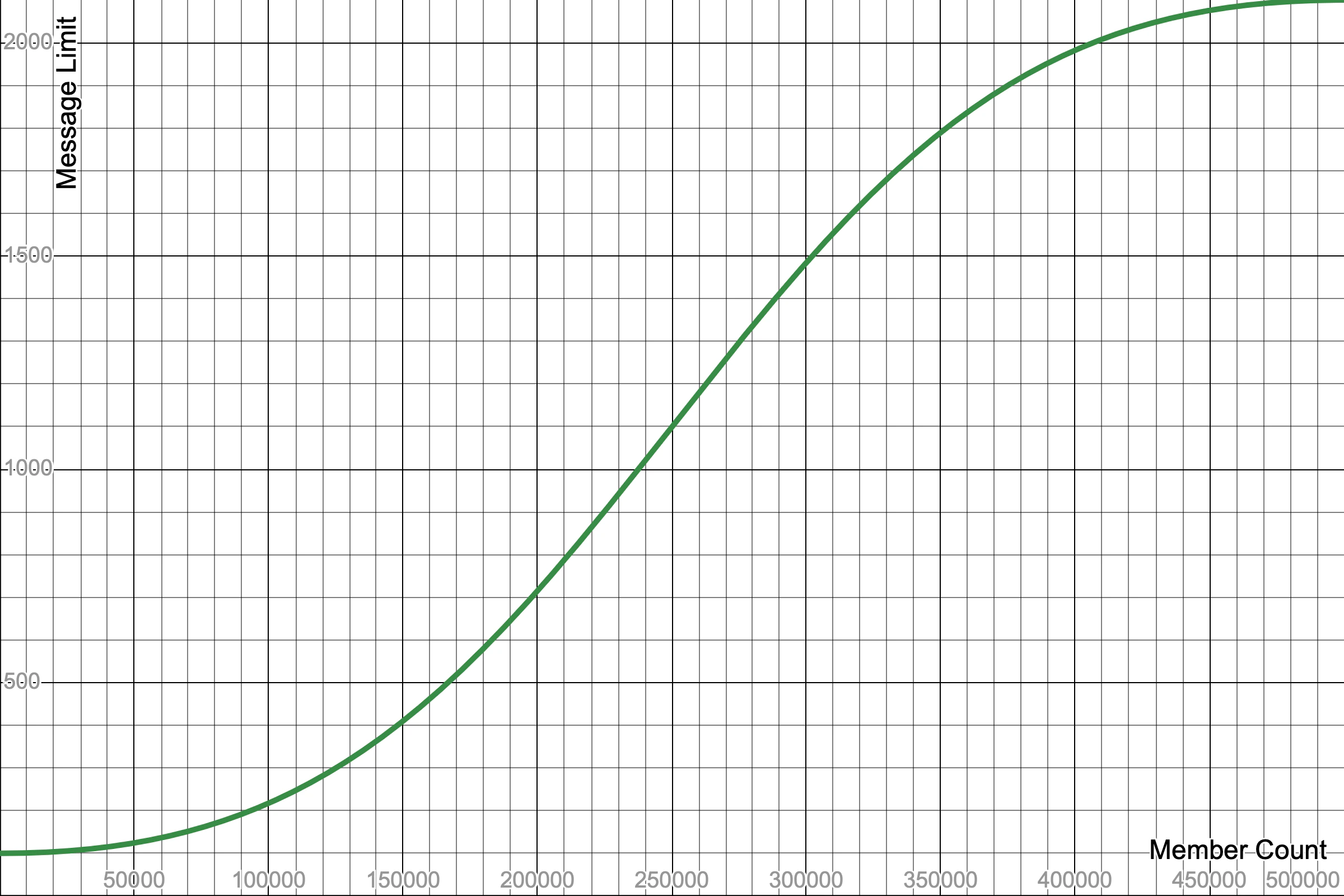
The channel message limit is calculated using the following equation:
$\frac{2000}{1+{\frac{x}{1 - x}}^{-2} } + 100$
Where $x = \frac{\text{member count}}{500000}$
In human terms, this means that the more members a server has, the more messages
Quark will store per channel.
The message limit ranges between 100 and 2100 messages per channel.
Visually, this looks like this:
 ### For Pro servers
Quark only has 1 criteria for expiring messages:
1. Messages are older than the message retention period for the server
The message retention period depends on how long the server owner has subscribed to
Quark Pro for and can be viewed by going to your [inventory](https://quark.bot/inventory).
Quark Pro has no channel message limits.
### For Pro servers
Quark only has 1 criteria for expiring messages:
1. Messages are older than the message retention period for the server
The message retention period depends on how long the server owner has subscribed to
Quark Pro for and can be viewed by going to your [inventory](https://quark.bot/inventory).
Quark Pro has no channel message limits.