> ## Documentation Index
> Fetch the complete documentation index at: https://docs.quark.bot/llms.txt
> Use this file to discover all available pages before exploring further.
# Search
> Guidance on searching through logs
## Introduction
For many servers, Quark sends *a lot* of logs. However, it is often useful to refer back
to a specific older log or group of older logs. For this reason Quark is designed to
ease this process of finding the logs you are looking for as much as possible. This
page takes you through the best ways to search through your logs!
## Searching Through Logs
Currently, Quark does not enable users to search through logs via the website.
All log searches must be done within Discord utilising [Discord's search feature](https://support.discord.com/hc/en-us/articles/115000468588-Using-Search).
### Finding logs by user
To find a log by a user, you must first obtain their **user ID**. This is a unique number
assigned to every Discord user.
Check out [this guide](https://support.discord.com/hc/en-us/articles/206346498-Where-can-I-find-my-User-Server-Message-ID)
on how to find the user ID
Now, insert the following into the search bar in the top right:
```
from: Quark Logger#8645 USER_ID_HERE
```
```
from: Quark Pro#2267 USER_ID_HERE
```
Make sure to replace `USER_ID_HERE` with the ID of the user you are searching for!
### Finding logs by role
To find a log by a role, you must first obtain its **role ID**. This is a unique number
assigned to every Discord role.
Check out [this guide](https://support.discord.com/hc/en-us/articles/206346498-Where-can-I-find-my-User-Server-Message-ID)
on how to find the role ID
Now, insert the following into the search bar in the top right:
```
from: Quark Logger#8645 ROLE_ID_HERE
```
```
from: Quark Pro#2267 ROLE_ID_HERE
```
### Finding logs by channel
To find a log by a channel, you must first obtain its **channel ID**. This is a unique number
assigned to every Discord channel.
Check out [this guide](https://support.discord.com/hc/en-us/articles/206346498-Where-can-I-find-my-User-Server-Message-ID)
on how to find the channel ID
Now, insert the following into the search bar in the top right:
```
from: Quark Logger#8645 CHANNEL_ID_HERE
```
```
from: Quark Pro#2267 CHANNEL_ID_HERE
```
### Finding a specific log type by user
To find a specific log type by a user, you must first obtain their **user ID**. This is a unique number
assigned to every Discord user. You must also know the log type you are searching for. For a list
of log types, check out the [log types page](/logs/types).
Check out [this guide](https://support.discord.com/hc/en-us/articles/206346498-Where-can-I-find-my-User-Server-Message-ID)
on how to find the user ID
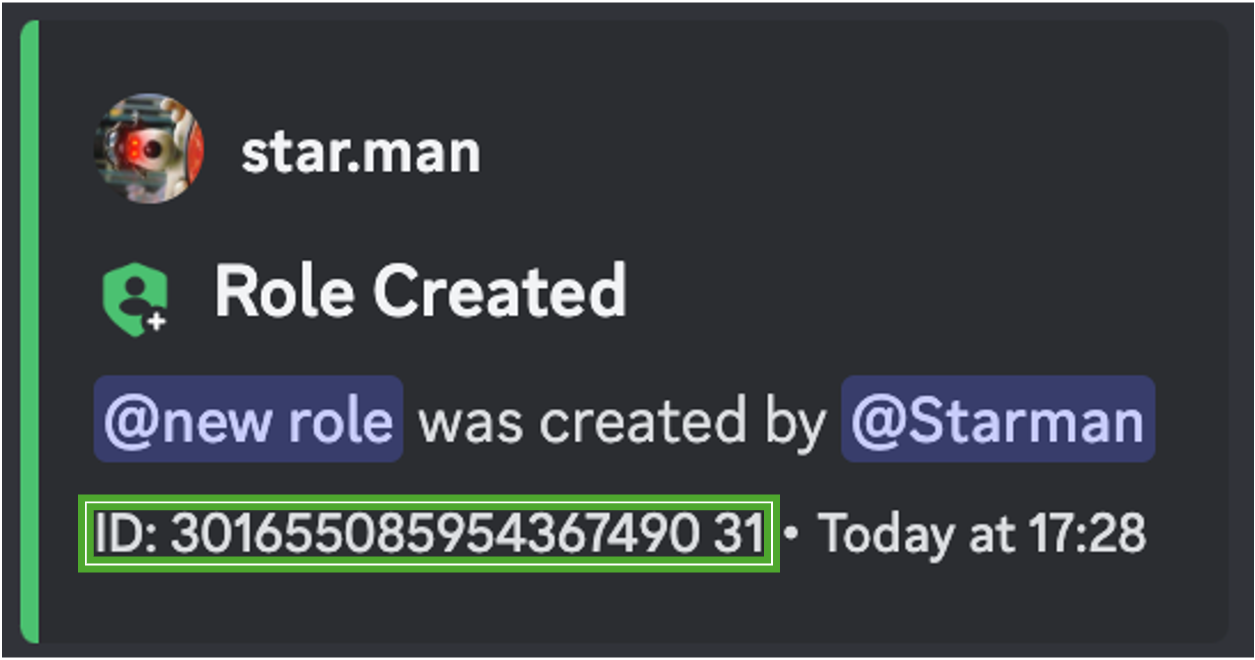
In the footer of every log message there is a log type ID appended to the user ID, separated
by a space as shown:
 ```
from: Quark Logger#8645 USER_ID_HERE LOG_TYPE_ID_HERE
```
```
from: Quark Pro#2267 USER_ID_HERE LOG_TYPE_ID_HERE
```
```
from: Quark Logger#8645 USER_ID_HERE LOG_TYPE_ID_HERE
```
```
from: Quark Pro#2267 USER_ID_HERE LOG_TYPE_ID_HERE
```